
Your salary has just been revised from ₹45,000 to ₹58,500. A shop advertises “20% off” and you want to know whether the final price is genuinely lower. Your exam marks moved from 72 to 81. In each case, the useful question is not simply what changed, but how large is the change compared with the original value. That is exactly what a percentage increase or decrease measures.
The good news is that the calculation is straightforward once you know which number goes in the denominator. The formula is:
Percentage Change = [(Final Value − Initial Value) ÷ |Initial Value|] × 100
A positive result is an increase; a negative result is a decrease. The same logic appears in official statistical guidance from Eurostat and the U.S. Bureau of Labor Statistics, which both compute percent change by dividing the difference by the earlier (base) value.
This guide explains the formula step by step, works through practical examples, distinguishes percentage change from percentage points, and shows how a Percentage Increase and Decrease Calculator can reduce errors when you are comparing multiple values.

What Is Percentage Increase and Decrease?
Percentage increase and percentage decrease are two directions of the same idea: percentage change. You compare a new value with an old value, express the absolute difference as a fraction of the old value, and convert that fraction into a percentage.
The critical point is the denominator. Percentage change is always calculated relative to the initial or original value, not the final value. This is why a move from 100 to 110 is a 10% increase, but a move back from 110 to 100 is only a 9.09% decrease. The base has changed, so the same absolute difference produces a different percentage. MathsIsFun uses this same 100 → 110 → 100 illustration to explain why the old value must sit in the denominator.
The Core Formula
| Symbol | Meaning |
|---|---|
| V₁ | Initial (old, original, baseline) value |
| V₂ | Final (new, updated) value |
| V₂ − V₁ | Absolute change |
| |V₁| | Absolute value of the initial value |
Percentage Change = [(V₂ − V₁) ÷ |V₁|] × 100
If the result is positive, the value has increased. If the result is negative, the value has decreased. The absolute value in the denominator prevents the sign of a negative baseline from flipping the direction of the result, although in everyday price, salary, and marks calculations the initial value is normally positive.
Why the Absolute Value in the Denominator?
Most everyday examples use positive starting values, so the absolute value makes no difference. It matters when the baseline itself is negative—for example, a company moving from a loss of ₹10,000 to a profit of ₹5,000, or a temperature moving from −5°C to +5°C. In those cases, a plain negative denominator would reverse the sign of the result and make an improvement look like a decline. The absolute value keeps the direction of the change aligned with the sign of the numerator. For standard price and salary problems, you can think of the formula simply as “change divided by the original value.”
How to Calculate Percentage Increase and Decrease (Step-by-Step)
Step 1: Identify the Initial and Final Values
Label the starting number V₁ and the ending number V₂. In a salary revision, V₁ is the old salary and V₂ is the new salary. In a discount, V₁ is the marked price and V₂ is the sale price.
Step 2: Find the Absolute Difference
Subtract the initial value from the final value:
Difference = V₂ − V₁
If V₂ is larger, the difference is positive. If V₂ is smaller, the difference is negative.
Step 3: Divide by the Initial Value
Divide the difference by the absolute value of the initial value:
Relative change = (V₂ − V₁) ÷ |V₁|
This step converts the raw change into a fraction of the starting point.
Step 4: Multiply by 100 and Interpret the Sign
Multiply by 100 to express the relative change as a percentage. A positive sign means an increase; a negative sign means a decrease.
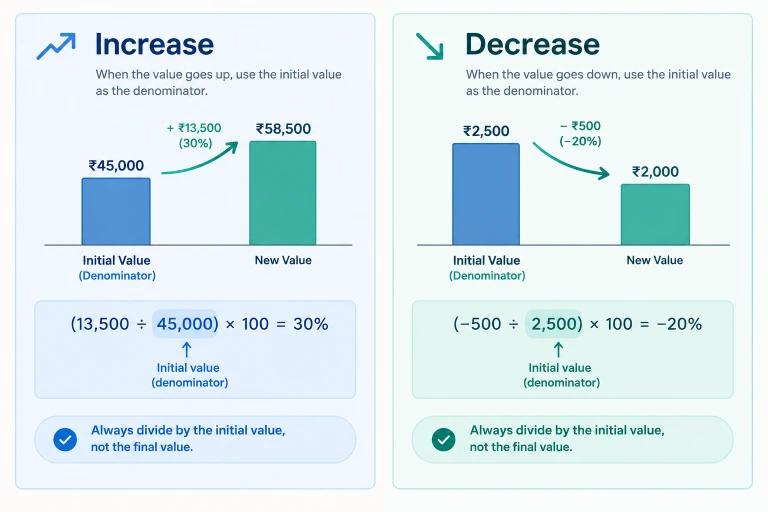
Worked Example: Salary Increment from ₹45,000 to ₹58,500
This example is also used on the CalbTools calculator page to illustrate the output.
- V₁ = ₹45,000
- V₂ = ₹58,500
- Difference = ₹58,500 − ₹45,000 = ₹13,500
- Relative change = 13,500 ÷ 45,000 = 0.30
- Percentage change = 0.30 × 100 = 30% increase
The salary grew by 30%. The absolute raise is ₹13,500, and the final salary is 1.30 times the original.
Worked Example: Price Reduction from ₹2,500 to ₹2,000
- V₁ = ₹2,500
- V₂ = ₹2,000
- Difference = ₹2,000 − ₹2,500 = −₹500
- Relative change = −500 ÷ 2,500 = −0.20
- Percentage change = −0.20 × 100 = −20%, or a 20% decrease
The negative sign is not a mistake. It tells you the direction of the change. In plain language, you would say “the price fell by 20%.”
Percentage Increase and Decrease Calculator: When to Use a Tool
The arithmetic above is manageable for one or two comparisons. Errors become more likely when you are comparing several products, reviewing month-on-month business figures, or checking a calculation under time pressure. A dedicated calculator removes the two most common failure points: choosing the wrong denominator and mishandling the sign.
What the CalbTools Calculator Does
The CalbTools Percentage Increase & Decrease Calculator accepts an initial baseline value and an updated final value. It returns:
- The percentage change with a clear increase or decrease label
- The absolute difference between the two values
- The relative multiplier (for example, 1.36× when a value rises by 36%)
The tool applies the formula ((V₂ − V₁) / |V₁|) × 100, which matches the standard percentage-change definition used by statistical agencies. The page explicitly notes that a positive result represents an expansion or markup, while a negative result represents a contraction or discount.

How to Use It
- Enter the starting baseline value—for example, an original salary, marked price, or previous-month revenue.
- Enter the updated final value—the revised salary, sale price, or current-month revenue.
- Review the percentage change, the absolute difference, and whether the direction is an increase or a decrease.
You can access the verified tool here: Percentage Increase & Decrease Calculator.
Limitations to Keep in Mind
A percentage-change calculator is a computational aid, not a substitute for understanding the base. It cannot decide whether the initial value you entered is the correct baseline. It also cannot resolve the conceptual difference between percentage change and percentage points, or tell you whether a 50% increase followed by a 50% decrease has returned you to the original value. Those judgments remain with the user. The CalbTools page itself carries a standard note that calculations are educational estimates and that rates, rules, and eligibility can change.
Percentage Change vs Percentage Points: A Critical Distinction
One of the most common sources of confusion in news reports and business dashboards is the difference between a percentage change and a percentage-point change.
Suppose an unemployment rate rises from 8% to 10%.
- The percentage-point change is 2 percentage points (10 − 8 = 2).
- The percentage change is (10 − 8) ÷ 8 × 100 = 25%.
Both statements are arithmetically correct, but they describe different things. “Unemployment rose by 2 percentage points” and “unemployment rose by 25%” are not interchangeable. Eurostat draws the same distinction: percentage points are used when comparing two percentages, while percentage change is used when comparing two values over time.
Use percentage points when the values themselves are already percentages, such as interest rates, unemployment rates, or exam pass rates. Use percentage change when you are comparing counts, prices, salaries, populations, or other quantities that are not themselves percentages.
Reverse Percentage Problems: Finding the Original Value
A reverse percentage problem gives you the final value and the percentage change, and asks for the original value. This appears frequently in discount pricing and salary restoration questions.
The safe method is to convert the percentage change into a multiplier and divide the final value by that multiplier.
| Situation | Multiplier | Reverse Calculation |
|---|---|---|
| 20% decrease (final price after discount) | 0.80 | Original = Final ÷ 0.80 |
| 25% increase (final value after raise) | 1.25 | Original = Final ÷ 1.25 |
| 12% decrease | 0.88 | Original = Final ÷ 0.88 |
| 8% increase | 1.08 | Original = Final ÷ 1.08 |
Example: A jacket is sold for ₹3,200 after a 20% discount. What was the marked price?
- A 20% decrease means the sale price is 80% of the original.
- Original = ₹3,200 ÷ 0.80 = ₹4,000.
- Check: 20% of ₹4,000 is ₹800, and ₹4,000 − ₹800 = ₹3,200. Correct.
A common mistake is to add 20% of ₹3,200 to ₹3,200, which gives ₹3,840. That is wrong because the 20% discount was calculated on the original ₹4,000, not on the sale price. BBC Bitesize uses the same multiplier logic for reverse percentages.

Why a 50% Increase Followed by a 50% Decrease Does Not Cancel Out
A 50% increase followed by a 50% decrease does not return a value to its starting point. The CalbTools page flags this explicitly as an important note.
Starting with 100:
- A 50% increase: 100 × 1.50 = 150
- A 50% decrease from 150: 150 × 0.50 = 75
The final value is 75, not 100. The second percentage is calculated on a larger base, so the same percentage produces a larger absolute reduction. In general, successive percentage changes multiply; they do not add. A 20% increase followed by a 20% decrease produces a multiplier of 1.20 × 0.80 = 0.96, which is a net 4% decrease, not zero.
This is why “get 20% off, then pay 20% tax” does not leave the price unchanged, and why investment losses require a larger percentage gain to recover. A 50% loss requires a 100% gain to break even, because the recovery is calculated on the reduced base.
Common Mistakes to Avoid
Dividing by the New Value Instead of the Original Value
This is the most frequent error. Percentage change is always relative to the initial value. Dividing by the final value produces a different number and reverses the comparison in reverse-percentage contexts.
Mixing Up Percentage Change and Percentage Difference
Percentage difference compares two values without treating either as the baseline, and it typically divides by the average of the two values. Percentage change treats one value as the original and the other as the new value. Use percentage change when there is a clear before-and-after relationship.
Ignoring the Sign
A negative result is information, not an error. It means the value decreased. If you are writing a report, state the direction in words: “a decrease of 20%” is clearer than “−20%” on its own.
Applying a Percentage Change to the Wrong Base
If a price rises by 10% and then rises by another 10%, the total increase is 21%, not 20%, because the second increase applies to the already-increased price: 1.10 × 1.10 = 1.21. Successive percentage changes compound.
Using Percentage Change on a Negative Baseline Without Care
If the initial value is negative, the standard formula with the absolute value in the denominator keeps the direction interpretable, but the result can be counterintuitive. A move from −100 to −50 is a 50% increase in the absolute value but a 50% decrease in the signed number. In such cases, state the baseline clearly and consider whether percentage change is the right measure at all.
Practical Applications at a Glance
For routine checks, the CalbTools Percentage Increase & Decrease Calculator will return the percentage change and the absolute difference without manual arithmetic.
The Bottom Line
Percentage increase and decrease are simple once you anchor the calculation to the original value. Subtract the old value from the new value, divide by the old value, and multiply by 100. A positive answer is an increase; a negative answer is a decrease. Keep percentage change separate from percentage points, remember that successive changes multiply rather than add, and use a calculator when you need speed or when multiple comparisons increase the risk of a denominator error.
If you want to check a salary revision, a discount, or a month-on-month figure, try the Percentage Increase & Decrease Calculator and compare the result with the formula above. The two should agree—and if they do not, the calculator will usually show you where the manual arithmetic went wrong.
1. What is the formula for percentage increase and decrease?
Percentage change = [(Final Value − Initial Value) ÷ |Initial Value|] × 100. A positive result is an increase and a negative result is a decrease.
2. How do I calculate a percentage decrease?
Subtract the final value from the initial value, divide the result by the initial value, and multiply by 100. For example, a fall from ₹2,500 to ₹2,000 is (−500 ÷ 2,500) × 100 = −20%, or a 20% decrease.
3. What is the difference between percentage change and percentage points?
Percentage change compares two values relative to the original value. Percentage points are the simple arithmetic difference between two percentages. A rise from 8% to 10% is 2 percentage points but a 25% percentage increase.
4. How do I find the original value after a percentage decrease?
Divide the final value by the multiplier. For a 20% decrease, the multiplier is 0.80, so Original = Final ÷ 0.80. If the sale price is ₹3,200, the original price was ₹3,200 ÷ 0.80 = ₹4,000.
5. Does a 50% increase followed by a 50% decrease return to the original value?
No. Starting at 100, a 50% increase gives 150, and a 50% decrease from 150 gives 75. Successive percentage changes multiply and do not cancel out unless the percentages are applied to the same base.
6. Can I use a calculator for percentage increase and decrease?
Yes. The CalbTools Percentage Increase & Decrease Calculator accepts an initial and final value and returns the percentage change, absolute difference, and relative multiplier. It is useful for checking multiple comparisons quickly.