CalbTools AI Prompt Templates क्या हैं? फीचर्स और इस्तेमाल का तरीका
मान लीजिए आपका एक छोटा salon है और आपको अपनी services दिखाने के लिए एक simple website चाहिए. आपने AI से मदद मांगी, लेकिन जवाब बहुत generic आया — क्योंकि AI को यह नहीं पता था कि आपका business क्या है, audience कौन है, और आपको output किस format में चाहिए. यहीं AI Prompt Templates काम आते हैं I
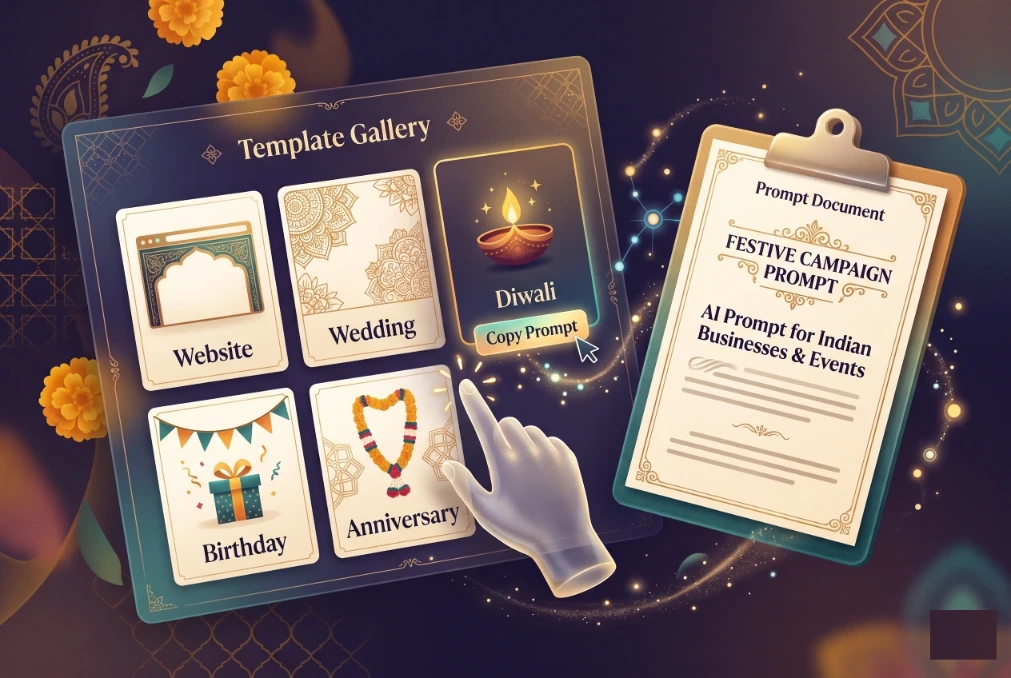
CalbTools Template Gallery में ऐसे 126 ready-to-use prompts हैं, जिन्हें आप copy या download करके अपने AI tool में paste कर सकते हैं. इस guide में समझेंगे कि ये templates क्या हैं, gallery में क्या-क्या मिलता है, और इन्हें अपने रोज़ के काम में कैसे इस्तेमाल करें I

AI Prompt Templates आखिर होते क्या हैं?
Simple भाषा में, prompt वह instruction है जो आप AI को देते हैं. Prompt template एक पहले से तैयार किया गया prompt होता है, जिसमें कुछ जगहें खाली रहती हैं I — जैसे business का नाम, city, audience, services, tone और language.
इसे form भरने जैसा समझिए. Form का structure ready होता है; आपको सिर्फ अपनी information डालनी होती है. Recipe की तरह भी — steps ready हैं, ingredients आप अपने हिसाब से डालते हैं I
एक अच्छा template आमतौर पर बताता है :
- AI को कौन सी role निभानी है, जैसे “आप एक experienced web designer हैं I”
- Task क्या है, जैसे homepage copy लिखना
- Context क्या है — business, city, audience
- Constraints क्या हैं — length, tone, language
- Output का format क्या होना चाहिए — headings, sections, table या code
Google Gemini की official prompt design guide भी clear और specific instructions देने पर ज़ोर देती है. Microsoft की prompt library documentation बताती है कि pre-designed prompts templates की तरह काम करते हैं, जिन्हें language, tone और detail के हिसाब से modify किया जा सकता है I
लेकिन template कोई magic button नहीं है. Output की quality आपके AI model, आपकी दी गई details और iteration पर depend करती है I
CalbTools Template Gallery में क्या-क्या मिलता है?
CalbTools Template Gallery एक prompt library है. Page पर फिलहाल 126 templates दिखते हैं, हालांकि title में “126+” लिखा है. ये 7 categories में बंटे हैं, और हर category में 18 templates हैं I
| Category | Templates | किस काम के लिए | Example template |
|---|---|---|---|
| Website | 18 | Business, portfolio, restaurant, gym, hospital, real estate, SaaS, e-commerce आदि | Modern Business Landing |
| Phone | 18 | Smartphone launch, repair, accessories, app landing, comparison, EMI calculator आदि | Smartphone Launch Page |
| Holiday | 18 | Resort, tour package, trek, cruise, safari, pilgrimage, weekend getaway आदि | Beach Resort Getaway |
| Tyohar | 18 | Diwali, Holi, Raksha Bandhan, Ganesh Chaturthi, Navratri, Eid, Christmas आदि | Diwali Celebration |
| Marriage | 18 | Wedding invitation, venue, photography, sangeet, mehendi, catering, lehenga आदि | Beach Wedding |
| Anniversary | 18 | 1st, 25th, 50th anniversary, gift ideas, dinner, photoshoot, card आदि | 25th Silver Jubilee |
| Birthday | 18 | Kids, adult, surprise party, theme, return gifts, banner, countdown आदि | Kids Birthday Party |
Page पर search box है, category filter buttons हैं, और हर card पर Copy और Download (.txt) buttons हैं. Source में dark-mode toggle भी दिखता है, Page का language mix है — UI Hinglish/English में है, जबकि card descriptions English में हैं, अगर आपको Hindi output चाहिए, तो prompt paste करते समय AI को साफ़ बता दीजिए कि जवाब Hindi में चाहिए I
Page पर login या signup का कोई wall नहीं दिखता I Title में “Free Prompts” लिखा है और homepage पर 100% free, no signup का claim है, यह website का claim है, इसलिए पैसे या account से जुड़ी किसी भी चीज़ से पहले current page पर एक नज़र डाल लें I
Search, filter और सही template चुनने का तरीका
- Search box में keyword डालें — English words जैसे wedding, diwali, gym, restaurant, phone अच्छे result देते हैं I
- Category filter से scope छोटा करें — Website, Phone, Holiday, Tyohar, Marriage, Anniversary या Birthday.
- Card का title और description पढ़ें. Description छोटा होता है, इसलिए अपनी ज़रूरत से match करें I
- Copy या Download चुनें. Copy clipboard में prompt लाता है; Download .txt file देता है I
- अगर कोई template बिल्कुल match नहीं करता, तो nearest template लेकर उसे edit करें — template को शुरुआती draft की तरह use करें I
Copy या Download के बाद असल में करना क्या है?
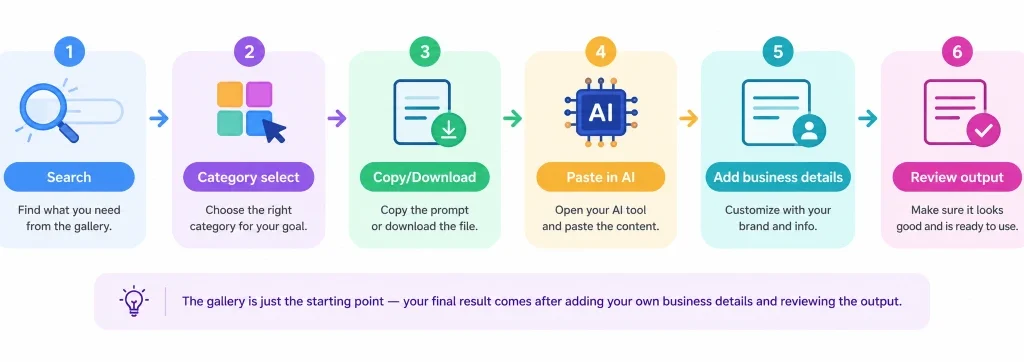
यह सबसे ज़रूरी step है. Prompt copy करना आधा काम है; असली output तब बनता है जब आप उसे सही तरीके से customize करते हैं I
- Prompt copy करें या .txt download करें I
- अपने AI assistant में paste करें — ChatGPT, Gemini, Claude, या कोई AI website builder. CalbTools page यह नहीं बताता कि कौन सा model best है; आप जो regular use करते हैं, उसी से शुरू करें I
- Template के blanks भरें — business name, city, audience, services, timings, contact, prices (अगर देना हो), tone और language.
- पहले outline मांगें, फिर section-wise content. इससे output control में रहता है और आप बीच में direction बदल सकते हैं I
- Output review और edit करें. Contact details, prices, offers, timings और policies — सब manually check करें. अगर AI code दे रहा है, तो उसे browser में test करें, mobile view check करें, और forms/links verify करें I
एक ज़रूरी बात: CalbTools का Template Gallery page खुद “Generate” button नहीं दिखाता; यहाँ Copy और Download options हैं. इसका मतलब यह prompt library है, AI output generator नहीं. Output आपका AI tool बनाता है I
3 practical examples — assumptions के साथ
Imp Note : अगर आप दिए हुए Prompts में से किसी भी prompt को copy करके किसी कोडिंग Ai Tools को देते है तो वो आपको इस तरीके का useful Html Code दे देगा जिसे आप डायरेक्ट डाउनलोड करके चला सकते है या NOTEPAD के माध्यम से index.html में सेव करके Use कर सकते हैं I
Let your
world glow.
May every diya bring a little hope, every sparkle a little wonder, and every shared moment a reason to smile.
Example 1: Gym & Fitness Studio Website बनाने के लिए AI Prompt Template
मान लीजिए आप अपना जिम शुरू करना चाहते हैं और उसके लिए एक आधुनिक वेबसाइट तैयार करवाना चाहते हैं। आपको हर सेक्शन का निर्देश अलग-अलग लिखने की जरूरत नहीं है। एक व्यवस्थित AI prompt template से शुरुआत की जा सकती है।
CalbTools Template Gallery में साझा किए गए Gym & Fitness Studio prompt का उद्देश्य इसी तरह की वेबसाइट के लिए निर्देश देना है। इसमें क्लास शेड्यूल, ट्रेनर प्रोफाइल, मेंबरशिप प्लान, ट्रांसफॉर्मेशन गैलरी और फ्री ट्रायल फॉर्म जैसे सेक्शन शामिल करने को कहा गया है।
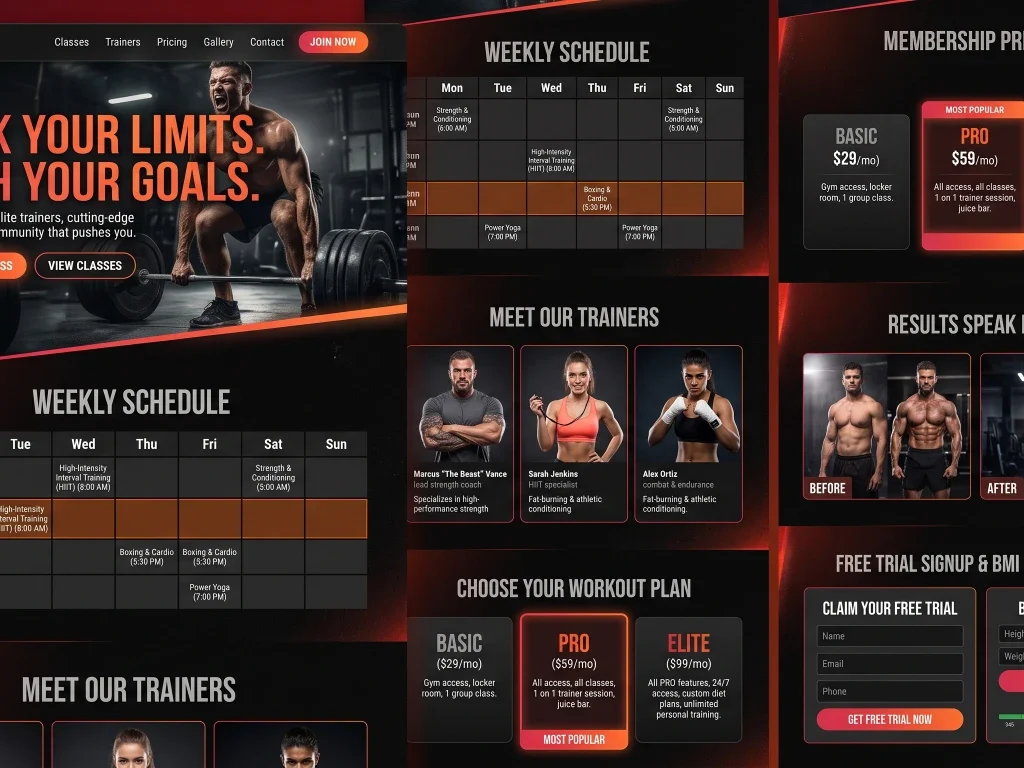
Build a high-energy gym & fitness studio website. Include: bold hero with motivational headline, Class schedule table (Mon-Sun), Trainer profiles with bios, Membership pricing (Basic/Pro/Elite), Transformation gallery, Free trial signup form, BMI calculator widget. Style: dark theme, red/orange gradients, strong sans-serif fonts.
इसका डिज़ाइन निर्देश dark theme, red/orange gradients और मजबूत sans-serif fonts पर केंद्रित है। साथ ही BMI calculator widget शामिल करने का निर्देश भी दिया गया है।
ऐसे template का उपयोग करते समय आप अपने जिम का नाम, वास्तविक क्लास टाइमिंग, ट्रेनर्स की जानकारी और मेंबरशिप की कीमतें जोड़ सकते हैं। AI से तैयार सामग्री प्रकाशित करने से पहले इन जानकारियों की जाँच जरूर करें। BMI calculator शामिल किया जाए, तो उसकी गणना और स्वास्थ्य संबंधी जानकारी की सटीकता भी सत्यापित करें।
Example 2: Wedding Photography Portfolio बनाने के लिए AI Prompt Template
अगर आप वेडिंग फोटोग्राफर हैं और अपनी तस्वीरों को प्रोफेशनल तरीके से दिखाने के लिए वेबसाइट बनाना चाहते हैं, तो CalbTools AI Prompt Templates का Wedding Photography टेम्पलेट एक उपयोगी शुरुआती निर्देश दे सकता है।
इस टेम्पलेट में वेबसाइट के लिए कई महत्वपूर्ण सेक्शन शामिल करने को कहा गया है:
- Full-screen Hero Slideshow: वेबसाइट खुलते ही शानदार वेडिंग तस्वीरों का स्लाइडशो दिखाना।
- Photography Portfolio: Candid, Traditional, Pre-wedding और Destination Wedding जैसी अलग-अलग कैटेगरी में तस्वीरें व्यवस्थित करना।
- About the Photographer: फोटोग्राफर के अनुभव, स्टाइल और काम के बारे में जानकारी देना।
- Packages & Pricing: वेडिंग फोटोग्राफी के पैकेज और उनकी कीमतें दिखाना।
- Client Love Notes: पुराने क्लाइंट्स के वास्तविक रिव्यू और अनुभव प्रदर्शित करना।
- Behind the Scenes: फोटोशूट के दौरान के खास पलों को दिखाना।
- Booking Form: डेट पिकर के साथ बुकिंग की तारीख चुनने की सुविधा देना।
- Instagram Feed और FAQ: सोशल मीडिया पर किए गए काम को प्रदर्शित करना और ग्राहकों के आम सवालों के जवाब देना।
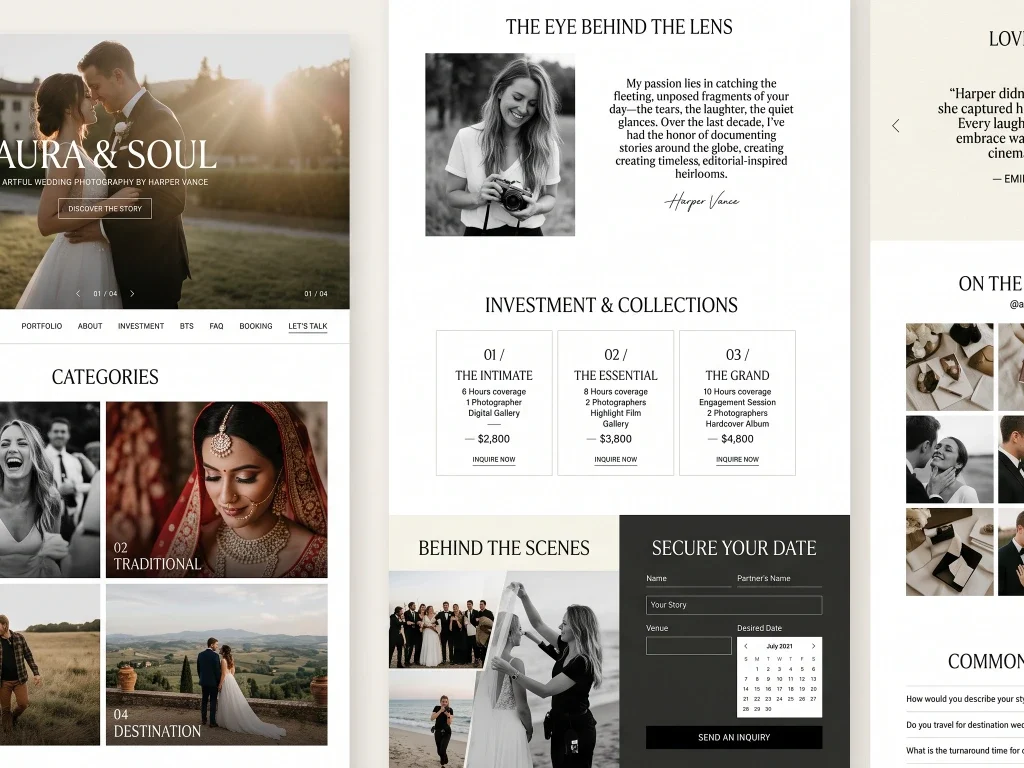
Design a wedding photographer portfolio. Include: full-screen hero slideshow, Portfolio categorized (Candid, Traditional, Pre-wedding, Destination), About the photographer, Packages & pricing, Client love notes, Behind the scenes, Booking form with date picker, Instagram feed, FAQ. Style: minimal, editorial, large imagery, black & white accents.
इस प्रॉम्प्ट में minimal और editorial design, बड़ी तस्वीरों तथा black-and-white accents पर जोर दिया गया है, ताकि वेबसाइट का मुख्य आकर्षण फोटोग्राफी ही रहे।
इसे इस्तेमाल कैसे करें? इस प्रॉम्प्ट को किसी उपयुक्त AI वेबसाइट बिल्डर या कोड जनरेट करने वाले AI टूल में दें। बेहतर परिणाम के लिए इसमें अपने स्टूडियो का नाम, शहर, वास्तविक पैकेज, संपर्क विवरण और ब्रांडिंग की जानकारी जोड़ें। वेबसाइट प्रकाशित करने से पहले बुकिंग फॉर्म, डेट पिकर, Instagram feed और मोबाइल लेआउट को टेस्ट करना भी जरूरी है।
ध्यान दें: यह टेम्पलेट AI को वेबसाइट का डिज़ाइन और संरचना बनाने के निर्देश देता है। वास्तविक सुविधाएँ इस बात पर निर्भर करेंगी कि आप किस AI टूल का उपयोग करते हैं और वह उन्हें सपोर्ट करता है या नहीं।
Example 3: Diwali Celebration Landing Page बनाने के लिए AI Prompt Template
त्योहारों के समय आकर्षक वेबसाइट या लैंडिंग पेज बनाने के लिए CalbTools AI Prompt Templates का Diwali Celebration टेम्पलेट एक उपयोगी शुरुआती विकल्प हो सकता है। यह AI को दिवाली से जुड़ी जानकारी, शुभकामनाएँ और उत्सव की सामग्री एक ही पेज पर प्रस्तुत करने के निर्देश देता है।
इस टेम्पलेट में निम्नलिखित सेक्शन और फीचर्स शामिल करने को कहा गया है:
- Animated Diya & Fireworks Hero: दीयों और आतिशबाजी से प्रेरित एनिमेशन वाला आकर्षक मुख्य सेक्शन।
- Diwali Wishes Greeting Card: दिवाली की शुभकामनाओं वाले ग्रीटिंग कार्ड।
- Rangoli Design Gallery: अलग-अलग रंगोली डिज़ाइनों की गैलरी।
- Diwali Shopping Offers: गिफ्ट, मिठाई और सजावट से संबंधित ऑफर्स दिखाने का सेक्शन।
- Puja Vidhi & Timings: पूजा विधि और पूजा के समय की जानकारी।
- Diwali Recipes: दिवाली पर बनाई जाने वाली मिठाइयों और पकवानों की रेसिपी।
- Wallpaper Downloads: दिवाली थीम वाले वॉलपेपर डाउनलोड करने की सुविधा।
- WhatsApp Share Button: शुभकामनाएँ WhatsApp पर साझा करने का विकल्प।
डिज़ाइन के लिए प्रॉम्प्ट में warm gold, maroon और festive lights जैसे रंगों और विज़ुअल एलिमेंट्स का सुझाव दिया गया है, जिससे पेज का लुक उत्सवपूर्ण और आकर्षक बन सके।
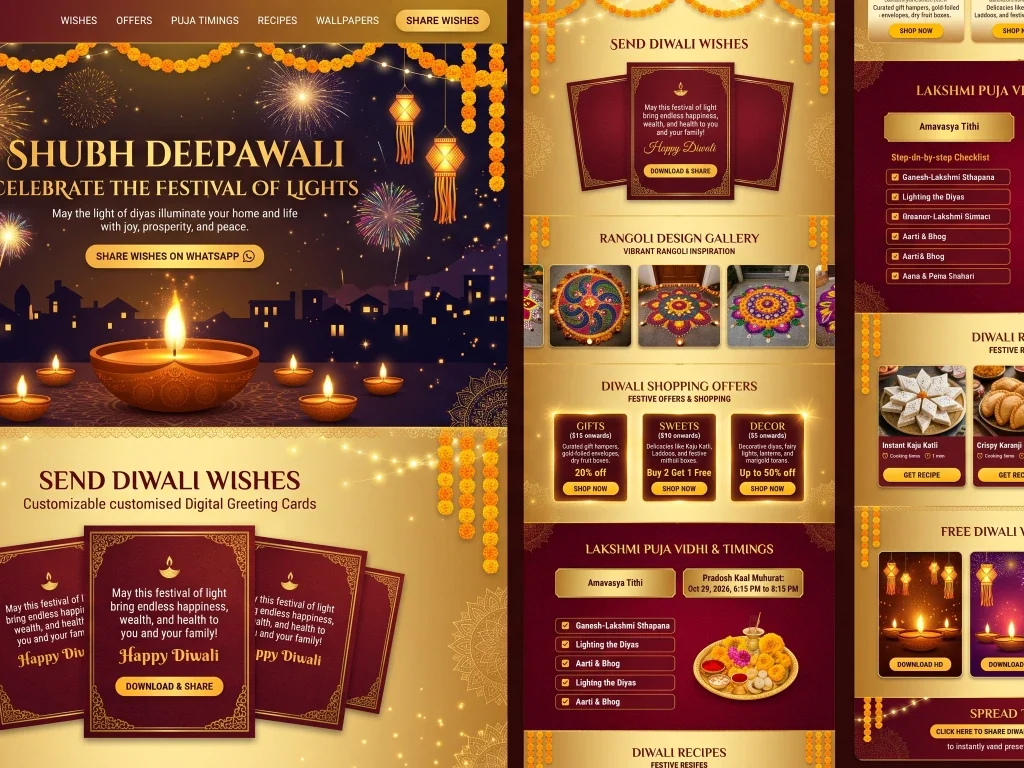
Create a Diwali celebration landing page. Include: animated diya & fireworks hero, Diwali wishes greeting card, Rangoli design gallery, Diwali shopping offers (gifts, sweets, decor), Puja vidhi & timings, Diwali recipes, Wallpaper downloads, Share wishes on WhatsApp button. Style: warm golds, maroons, festive lights.
इसे इस्तेमाल कैसे करें? इस प्रॉम्प्ट को किसी AI वेबसाइट बिल्डर या कोड जनरेट करने वाले AI टूल में इस्तेमाल करें। आप इसमें अपने ब्रांड का नाम, दिवाली ऑफर्स, स्थानीय कार्यक्रमों की जानकारी और अपनी पसंद की शुभकामनाएँ जोड़ सकते हैं। पब्लिश करने से पहले पूजा के समय की जानकारी सत्यापित करें और जाँचें कि वॉलपेपर डाउनलोड तथा WhatsApp शेयर बटन वास्तव में काम कर रहे हैं।
ध्यान रखें कि यह एक वेबसाइट बनाने के लिए निर्देशों का टेम्पलेट है। एनिमेशन, डाउनलोड और शेयरिंग जैसी सुविधाएँ वास्तव में काम करेंगी या नहीं, यह इस्तेमाल किए गए AI टूल और तैयार वेबसाइट के कार्यान्वयन पर निर्भर करेगा।
किन लोगों को सबसे ज़्यादा फायदा?
- Small business owners: website या landing page का पहला draft बनाने के लिए I
- Freelancers और agencies: client brief से पहले starting point पाने के लिए I
- Students: prompt engineering और AI instruction design सीखने के लिए I
- Event planners और wedding vendors: invitation page, schedule और FAQ का content बनाने के लिए I
- Developers: landing page का structure और copy जल्दी draft करने के लिए I
- Content creators: festival, birthday और anniversary content ideas के लिए I
Common mistakes और limitations
- Template को बिना customize किए use करना, Generic input = generic output.
- AI output को fact-check न करना, Prices, dates, contact details और policies हमेशा verify करें I
- Sensitive personal data paste करना, Customer ke phone numbers, payment details या ID numbers AI में न डालें I
- AI-generated code को बिना test live करना, Mobile view, forms, links और loading speed check करें I
- English description को Hindi output समझ लेना. AI को साफ़ बताएं कि output Hindi में चाहिए I
- हर AI model का output अलग हो सकता है, एक ही prompt ChatGPT, Gemini और Claude में अलग result दे सकता है I
- Copy/Download browser permissions पर depend कर सकते हैं, अगर button काम न करे, prompt manually select करके copy करें I
- Template legal, privacy या SEO compliance की जिम्मेदारी नहीं लेता, Final content की जिम्मेदारी आपकी है I
- “Free” claim website का है, Third-party AI tool के charges अलग हो सकते हैं I
CalbTools के बाकी tools के साथ combine करें I
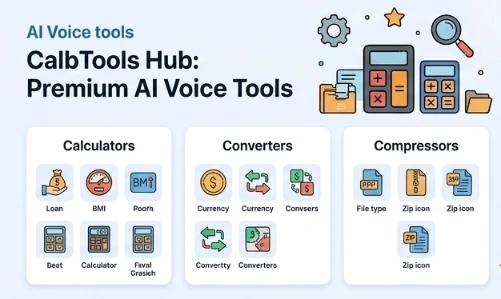
CalbTools homepage पर 100+ free tools का claim है — AI Tools, Calculators (EMI, SIP, GST), PDF Tools, Image Tools, VoiceCafe, Government Schemes और Developer Tools. आप एक ही workflow में template और tools combine कर सकते हैं:
- Template से website copy या structure draft करें.
- Image tools से photos resize या compress करें.
- PDF tools से documents merge या split करें.
- QR code generator से contact या link का QR बनाएं.
Specific tool URLs यहाँ verify नहीं किए जा सके, इसलिए homepage से explore करना best है: CalbTools के 100+ free tools.
Free है या नहीं? Privacy का ध्यान I
CalbTools homepage पर लिखा है: 100% free, no hidden charges, no premium plan, no signup. Template Gallery के title में भी “Free Prompts” है, और page पर login wall नहीं दिखता. यह website का claim है; independent audit नहीं है I
Privacy के लिए:
- CalbTools के अपने tools browser-based processing का claim करते हैं I
- लेकिन जब आप prompt किसी third-party AI tool में paste करते हैं, तो उस tool की privacy policy लागू होती है I
- Customer का personal data, phone numbers, payment details या ID numbers — कुछ भी sensitive AI में paste करने से पहले सोचें I
- Business details (public info) देना ठीक है, लेकिन confidential information avoid करें I
1. CalbTools AI Prompt Templates free हैं?
हाँ, CalbTools AI Prompt Templates बिल्कुल फ्री हैं।
2. क्या मैं इन prompts को ChatGPT या Gemini में use कर सकता हूँ?
हाँ, Prompts को copy या download करके किसी भी AI assistant में paste किया जा सकता है, CalbTools किसी specific model को mandatory नहीं बताता I
3. क्या CalbTools खुद website या content generate करता है?
Template Gallery एक prompt library है, वहाँ Copy और Download options हैं, “Generate” button नहीं. Output आपका AI tool generate करता है I
4. Prompts Hindi में हैं या English में?
Card descriptions अंग्रेज़ी में हैं, लेकिन आप AI को साफ़ instruction देकर Hindi output मांग सकते हैं I
5. Copy और Download button कैसे use करें?
Card पर Copy या Download (.txt) button दबाएं. अगर browser clipboard block करे, तो prompt manually select करके copy करें I
6. क्या ये templates professional website के लिए काफी हैं?
ये एक मजबूत starting point हैं, लेकिन final website के लिए human review, testing, SEO, accessibility और legal pages की ज़रूरत होती है. Template को final product नहीं, draft की तरह treat करें I
निष्कर्ष
AI Prompt Templates आपको blank page से बाहर निकालते हैं. वे हर काम perfect नहीं करते, लेकिन एक मजबूत शुरुआत देते हैं — बशर्ते आप उन्हें अपने business के हिसाब से customize करें और output को review करें I
अगली बार जब AI से website copy, event page या festival landing page बनवाना हो, तो पहले CalbTools Template Gallery में अपनी category देखें. एक template copy कीजिए, अपनी details भरिए, और AI से draft बनवाइए I
👉 CalbTools Template Gallery खोलें और अपना पहला prompt try करें I